How to sign up for OKX and pass KYC, and what to fix if you're rejected
Before you start, have three things ready: a dedicated email, a password manager and your ID, plus decent light for the photos. Then:
- Check that the referral code field shows
OK18866before you submit the form; it can't be added later. - After you submit verification, OKX's Help Center says it is reviewed within 24 hours.
- If you're rejected, fix the one thing the notice names and resubmit.
- OKX's Risk & Compliance Disclosure lists restricted jurisdictions including jurisdictions in the United States and its territories, Canada, Hong Kong, Japan, India and Malaysia, among others, and okx.com does not serve mainland China; OKX US is a separate platform this site doesn't cover.
*Referral link from independent third-party site CryptoDesk. OKX pays us a referral commission; your trading fees don't go up. Eligibility and any discount (up to 20% off trading fees) are subject to OKX's current terms.
See the prep checklistWhat you need before signing up for OKX
Two minutes of prep saves a lot of friction later:
- A dedicated email address. Proton, Gmail, or iCloud all work. Don't use your work email or your everyday personal email — crypto traffic gets noisy fast, and a dedicated inbox is a better baseline for phishing defence.
- A password manager. 1Password, Bitwarden, or iCloud Keychain. OKX requires a strong password, and hand-typed passwords are easy to capture on a phishing page. Generate the password in your manager and let it autofill.
- Your government ID + good lighting. KYC will ask for front and back photos plus a face liveness check. Find a daylit spot by a window before you start, so you don't have to redo it.
Step 1: create the account
Click through from CryptoDesk's referral button
The sign-up button at the top of this page already carries the code OK18866 in its link. On the OKX signup form, check at the email step that the referral code field shows OK18866; if it's empty, type it in.
okx.com. Lookalike spellings (a zero for the O, extra words such as -vip or -secure, other endings) are a phishing sign.Pick your country, sign up with email, and check the referral code
Once you hit Sign up, the first field on the form is Country/region: pick where you currently live (not your nationality), read and acknowledge the terms of service, then select Next to reach the email field. OKX doesn't serve every region (its Risk & Compliance Disclosure lists jurisdictions in the US and its territories, Canada, Hong Kong, Japan, India and Malaysia among the restricted jurisdictions, and mainland China isn't served either), so pick your real country of residence rather than one that lets the form through.
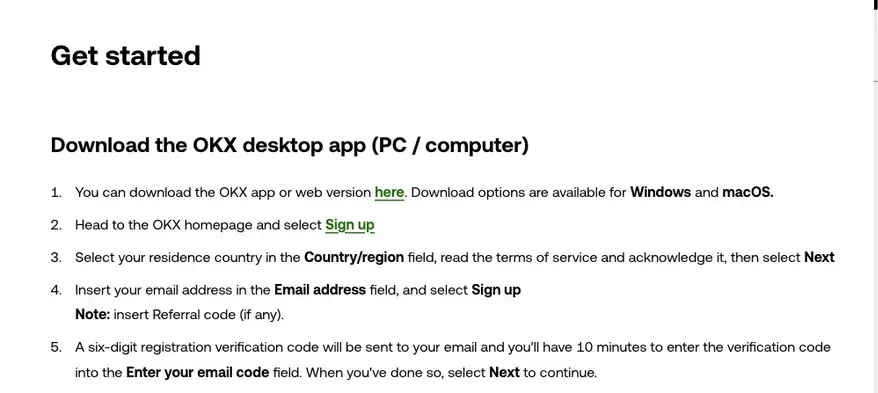
Use a dedicated email you can keep receiving mail on: email works everywhere, so switching carriers, networks, or countries won't cut off your verification codes, while a swapped SIM card makes account recovery noticeably harder.
The referral code goes in on this same email step (OKX's steps note "insert Referral code (if any)" right here). If you arrived from CryptoDesk's button, it should already show OK18866; if the field is empty, type OK18866 in manually — the result is the same.
Enter the email code, then verify your phone
OKX emails a 6-digit code; enter it within 10 minutes. If it doesn't arrive:
- Check spam / junk first;
- Don't hit "Resend" over and over; give it a little while before trying again.
Next, enter your phone number with its country code and select Verify now; a 6-digit code comes by text, also to be entered within 10 minutes. OKX states that both a phone number and an email address must be bound during registration, so this step can't be skipped.
Set a strong password last
Password requirements: mix numbers, letters, symbols, and upper and lower case. Have your password manager generate 16-20 characters — far more reliable than anything you'd make up by hand.
The account exists now. But none of the real trading features are active yet — you still need to get through identity verification.
Step 2: identity verification (fill in the form, then wait for review)
KYC (Know Your Customer) is the identity verification OKX runs to meet anti-money-laundering obligations. Trading, deposits and withdrawals only open up once it's approved — and which products you actually get depends on your jurisdiction. OKX says so on the verification page itself: not all products are available in all jurisdictions.
Open Identity Verification
In the app: Menu → Account settings → Profile → Identity verification. You can also log in and follow the on-screen prompts to Identity verification.
Fill in country of residence and nationality, then pick an ID type
These are two separate fields, so don't let one stand in for the other: country of residence is where you actually live right now, nationality is the one printed on your document. Having them differ is completely normal (working or studying abroad counts) — answer honestly, and expect that this is the case where OKX may later ask for a proof of address. The ID type follows whichever country issued your document:
- National ID card — front and back required.
- Passport — best option for international users and dual-nationality holders. Photo page + selfie.
- Driving licence — available in some regions.
Enter name + ID number + date of birth + residential address
The name spelling must match your ID exactly — including spacing and given-name / surname order. For non-Latin scripts, use the same characters that appear on the ID. Put your real residential address in, too: if a proof of address ever gets requested, the document has to line up with what you typed here.
Photograph front and back of the ID
OKX prefers live photos taken in the moment (don't reuse old photos). Shooting tips:
- All four corners must be in frame — a cut-off corner is enough to get the photo rejected.
- Even lighting — natural daylight near a window beats overhead lamps, which cause glare on the laminate.
- No filters or edits — beauty filters, sharpening, anything that tweaks pixels will trip the AI check.
- No photocopies and no screen recaptures — instant rejection.
Face liveness check
OKX will prompt a few actions — blink, turn your head, open your mouth. Follow along. Tips:
- Remove glasses, masks, and hats;
- Find a clean, plain wall as background;
- Light your face from the front — not backlit.
Submit and wait
The page will show "Under review." OKX's Help Center says applications are reviewed within 24 hours, and you're notified once the review is done.
Don't resubmit during review; it doesn't speed anything up.
Why OKX rejects a KYC submission: 5 causes to check
Before you resubmit, check your photos and form against these five causes, in no particular order:
⚑ Corner of the ID cut off or cropped
Reshoot with the ID flat on a plain solid surface, the phone about 12 inches above it, and the whole document plus a margin of the surface in frame.
⚑ Glare or shadow covering key info
The laminate on an ID card reflects badly under angled light. Put the light source behind you and slightly above, or shoot in completely diffuse light (overcast daylight near a window is ideal).
⚑ Photocopy, scan, or screen recapture
OKX's KYC system detects non-live captures (reflections, pixel grids, screen moiré patterns) and rejects on the spot. Shoot live with the camera app.
⚑ Name spelling doesn't match the ID
Common with passports: MRZ abbreviation vs. visual page, transposed middle names. Match the visual page exactly, character by character.
⚑ Face check fails (light or angle)
Backlight, masks, sunglasses, or moving during capture will all fail. Stand still, light from the front, plain background. Reshoot with those points in mind; if it's rejected again, use the order below.
How to resubmit after a rejection
OKX's rejection email or in-app notification usually says what failed. Work through it in this order:
- Read the reason → fix that one thing. Don't "redo everything" — fix the specific issue first.
- Give it some time before resubmitting.
- Still failing → talk to support. If a corrected resubmission is rejected again, reach OKX through the Support Center chatbot and flag a possible technical issue.
If anyone offers to "help you pass KYC" — say no. First, handing your ID to a stranger is dangerous. Second, if OKX ever detects that the KYC name doesn't match the real controller, the account gets frozen and withdrawals blocked. Third, you have no recourse if anything goes wrong later. KYC must be done by you, in person.
What OKX may still ask for after approval
Let's clear up one misconception first: OKX's personal verification page has no "Lv.1 / Lv.2" tiers, and there's no table of limits by level. What you fill in is that one set of fields — country of residence, nationality, name, date of birth, ID type and number, residential address — plus the document photos and a selfie.
Two things can still be requested on top of that:
- Proof of address — the official page words it as "if applicable." When it is asked for, OKX's proof-of-address page says most accepted documents must have been issued within the last 3 months; the address on it has to match what you entered.
- Other enquiries — a source-of-funds explanation, for instance, around large deposits and withdrawals or when risk controls are triggered.
OKX's verification page also states that not all products are available in all jurisdictions. Getting verified doesn't mean everything opens up where you are — log in and your own account will show you what's on offer.
After KYC: security, first deposit, first trade
Once KYC is approved, do these three things in order:
- Configure security settings — 2FA + anti-phishing code + withdrawal allowlist. Without this layer the account is essentially bare. See: OKX account security settings
- Make your first deposit — pick the method that fits what you already hold. See: OKX deposit methods: P2P, card, bank, USDT
- Run a small spot trade — buy a small amount of BTC to learn the interface. See: Your first OKX spot trade
FAQ
If my KYC is rejected, can I resubmit?
Yes. OKX rejection notices usually explain what failed. After a rejection you can fix the issue and submit again, from the same account.
Can I use my passport?
Yes. OKX KYC accepts national ID cards, passports, and driving licences. Passports are the smoothest option for non-residents and dual-nationality users — and they save you from photographing a second side.
Are there verification tiers? How far do I have to go before I can trade?
OKX's personal verification page has no Lv.1 / Lv.2 tiers. You fill in country of residence, nationality, name, date of birth, ID type and number and residential address as prompted, submit the document photos and a selfie, and once that's approved you can trade, deposit and withdraw. Some regions and some products additionally call for a proof of address, or aren't offered at all.
Can I change my name or ID after KYC is approved?
Usually no. OKX KYC binds your name and ID number on first approval. Legitimate reasons (a renewed passport, for example) require a support ticket and stricter review.
What if the referral code field on the signup form is empty?
Type OK18866 manually — it works the same as clicking through our button. Don't sign up first thinking you'll add it later — referral codes cannot be backfilled once the account is created. See our OKX referral code page for details.
This page contains an OKX referral link · OKX pays us a referral commission · your trading fees don't go up